Claude for SEO: 3 Quick Wins You Can Do Today
Use Claude to boost your SEO in under an hour. Get a site audit, add internal links, and generate schema markup.
You know you should be doing SEO… But let’s be honest, you're busy enough running your business. You’re not here to be an SEO expert. And so you shouldn’t be. Leave that for the experts!
But before you call up a pro, here are three quick ways you can use Claude (or ChatGPT) to capture low-hanging SEO fruit, without going down any rabbit holes.
If you’ve got access to your website and basic technical know-how, let’s begin:
1. Run a Site-Wide Audit
Instead of guessing what's broken, ask Claude to audit your entire site:
"I need help auditing my website for SEO. Can you ask me some questions about my business, target keywords, audience, and location so you can give me a proper audit?"
Claude will ask about:
Your main services/products and keywords
Who you're trying to reach
Your location (crucial for local businesses)
What conversion actions matter (calls, enquiries, bookings)
Then give Claude your homepage URL, and if you’re able to, your sitemap e.g. www.yourwebsite.com/sitemap.xml. You'll get a prioritised list of what's actually holding you back to go off an action.
Tip: AI will often guess keyword search volumes, so you'll still need proper SEO tools (like Google Keyword Planner or Ahrefs) for accurate data.
2. Add Internal Links to Your Blog Posts
Internal linking helps Google understand your site structure and keeps visitors clicking around. But manually finding relevant posts to link together? Tedious.
Example prompt:
"I've just written a blog post about [topic of your new post]. Here's the content: [paste your post]
Can you check my blog archive at [your website URL/blog] and suggest 3-4 other posts I should link to from this new post? Show me where to add the links and write the anchor text."
Claude will scan your existing content, find relevant posts, and suggest natural placement with anchor text that doesn't sound forced.
3. Add Schema Markup
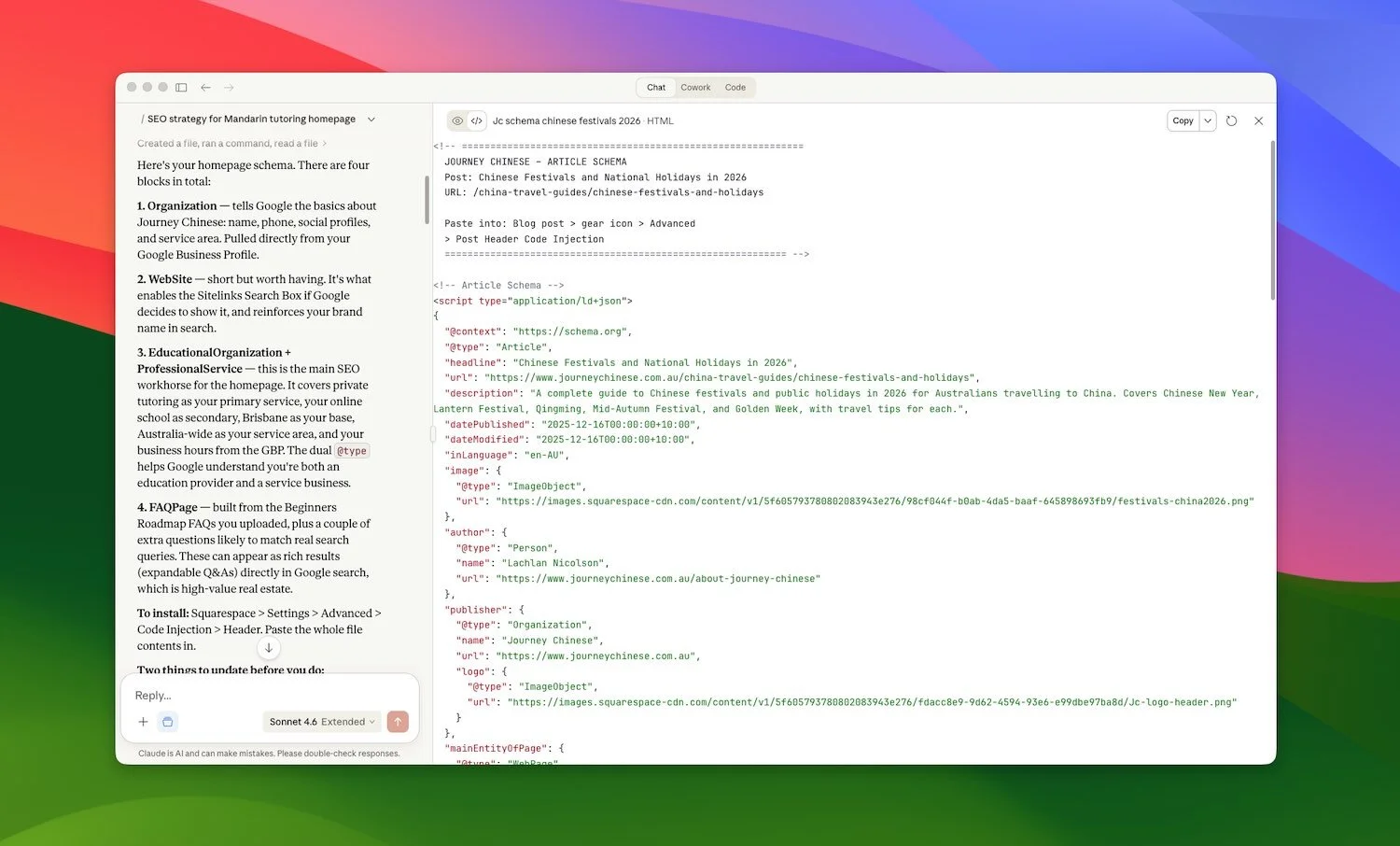
Schema markup is code that helps Google understand your content better, and show those fancy rich results in search (star ratings, FAQs, event details, etc.). It may also help AI search systems better understand and cite your content."
Most small business websites dont have schema because it’s technical to create. But Claude can now write the code for you.
Example prompt:
"I need schema markup for my [service page/blog post/local business page]. Can you ask me some questions about the page so you can generate the right schema markup code?"
Claude will ask about:
What type of page it is (article, service, local business, FAQ, product, etc.)
Your business details (name, location, services)
Relevant pricing or rating information
Author and publication details (for blog posts)
Then it'll generate the code and show you where to paste it.
Test it works here: https://search.google.com/test/rich-results

SEO won't save a website that humans don't actually want to use.
If your site is slow, confusing, or looks like it hasn't been touched since 2015, you’ll struggle to convert visitors into customers. You need a professional website that makes it easy for people to work with you.
Need help fixing your website? Book a Call and let's make sure your site actually converts the traffic SEO brings you.
Written by Lachlan Nicolson. Business Coach at LeaderGuide — Small Business Coaching & Consulting